Among Us Mod Menu APK for Android: mobile hacks and cheats, no patched game
Looking for an Among Us hack for Android, a mod menu APK that runs on mobile, without installing a repacked game from an unknown source? The CrewCore Mod Loader is a small loader app that runs your official Play Store copy of Among Us inside its own process with BepInEx, and brings the same ModMenuCrew menu (250+ features) to Android 8.0+. Your game stays the one Google Play installed and updates.
Android 8.0+Build vc67 · Among Us 2026.9.29250+ features~52 MBSHA-256 published
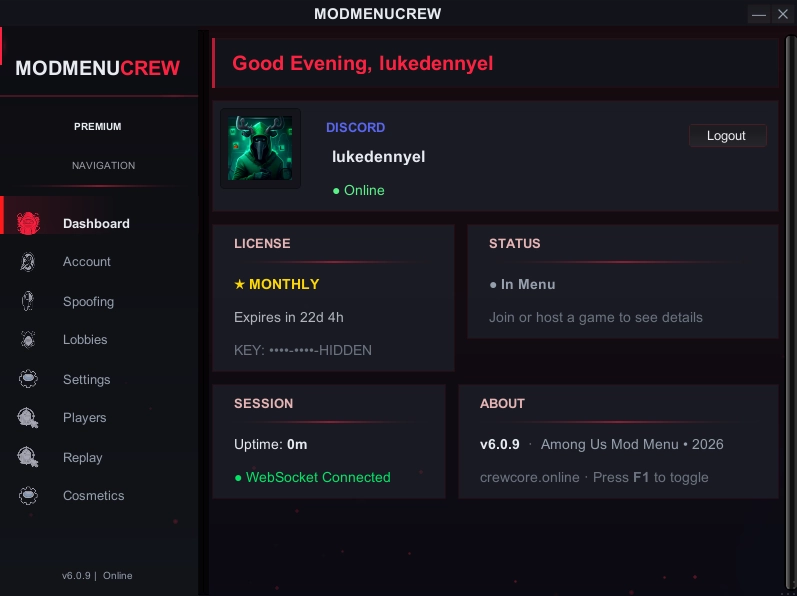
The same ModMenuCrew menu; on Android the CrewCore Mod Loader opens it inside the game.
What makes it different
Runs your official install
The loader opens the Among Us that Google Play installed on your phone inside the loader's own process. The game's APK is never modified, re-signed or redistributed. CrewCore ships no copy of Among Us, and you keep updating the game from the Play Store as usual.
Real BepInEx on Android
An embedded .NET runtime boots the BepInEx IL2CPP chainloader before the game code runs, exactly the plugin architecture ModMenuCrew uses on PC. That is why the Android menu is the same menu, not a cut-down "mobile mod menu".
No repacked APK
Unlike patch-based loaders such as LemonLoader, which rebuild the game's APK, or repacked "Among Us mod APK" files from third-party sites, CrewCore never modifies the game. You install one small loader app, verify its SHA-256, and that is the only file that is not from Google Play.
Among Us mobile hacks and cheats for Android
The Android plugin is the same ModMenuCrew menu as on PC: 250+ features, organized in the same themed tabs. The full catalog lives on the PC page; the categories most people come to Android for:
Roles
Always Impostor (when hosting)
Viper / Phantom / Shapeshifter: 1 weekly rotating role free, all three on Premium
Role pre-assign
Cosmetics
Unlock all cosmetics: skins, pets, hats and visors
Nameplates and name / color spoofing
Visible to everyone in the lobby
Vision & movement
ESP and radar (see every player through walls)
Speed and no-clip movement
Teleport
Sabotage & host tools
Sabotage triggers and door control
Kick / ban / force-start as host
Lobby and game-settings controls
Same menu, same server-side gating: Premium features are unlocked by the server for Premium keys on PC and Android alike: one key type, one account.
Requirements
Android 8.0 or newer (API level 26) on a 64-bit ARM phone or tablet (arm64), which covers practically every device sold since 2017. iPhone and iPad are not supported.
The official Among Us from Google Play, installed and updated. The current loader build targets Among Us 2026.9.29.
About 52 MB of storage for the loader APK (52,016,361 bytes) and an internet connection.
A Discord account and membership in the CrewCore Discord server: the Download Station and the key flow both use Discord login.
No Google account is needed to play online. A guest account already plays online; the optional Google Merge login (see below) adds free chat and your friends list.
Install step by step
Download the loader from the Download Station
Open the Download Station, sign in with Discord and pick Android APK. The download is a short-lived signed link, so always get it here and never from a reposted mirror.
Install the APK
Open CrewCore_ModLoader-vc67.apk from your downloads. Android asks you to allow installs from this source: allow it for this file only, then install. Before installing, you can compare the file's SHA-256 with the value in the Verify your download section.
Open CrewCore Mod Loader
Launch the loader. It checks that the official Among Us is installed and whether it matches the supported game version; a different version shows a warning. The first launch can take from 45 seconds to about 2.5 minutes while the Among Us account service registers your device.
Sign in with Discord and activate your key
Sign in with Discord inside the loader and paste your key from Get Key (free, 2-step verification) or your Premium key (instant).
Optional: Google Merge login for free chat and friends
Open accounts.innersloth.com/account-management in your browser, complete Innersloth's official account flow, and paste the final URL into the loader's panel. The loader verifies the token on your device and hands it to the game. No password ever goes through CrewCore.
Tip: apply the merge address before pressing PLAY, in the same session. It is valid for 60 minutes. Since vc67 the loader keeps it in the phone's secure storage until it expires, so closing and reopening the app within that time does not lose it; after that, repeat the flow. You can skip this step: online play already works with a guest account.
Play and open the menu
Start Among Us from the loader. A phone has no F1 key: open ModMenuCrew with the floating button or a three-finger tap on the screen. Inside you get the same tabs as on PC.
Online play, free chat and the Google Merge login
Online play works without any extra login. A guest account plays online inside the loader. What a guest account cannot use is free chat and the friends list, and that is what the Google Merge login unlocks.
Google Play Games sign-in cannot complete inside a hosted process, so the loader uses Innersloth's own account-merge flow instead: you finish the official login in your browser, and the resulting merge URL carries a Google identity token. The loader checks that token locally (signature, issuer, audience and expiry) and passes it to the game's own login. The game then signs into your merged Innersloth account.
CrewCore never uses the game's own client credentials, never injects account identifiers, and does not store the token.
Does it work with the latest Among Us version?
Each loader build is generated against one specific game version. The current build, vc67, targets Among Us 2026.9.29. When Innersloth ships a new version, the loader shows a version warning instead of pretending everything is fine. Wait for the next CrewCore build, which is published on the home page hash table together with its SHA-256. Builds are updated after each game patch, typically within a few days.
Safety and what we don't do
No game redistribution. CrewCore does not ship Among Us or any part of it. A legitimate Play Store installation is required.
No purchase or currency hacks, no ad removal. The loader does not touch the in-game store, Beans, cosmetics you have not bought, or the game's ads.
No "no-ban" promise. Using any mod in public lobbies can lead to reports, and Innersloth can act on them. Play in private lobbies with friends if you want to avoid that risk.
Verifiable builds. Every official APK is published with its SHA-256 and the signing-certificate fingerprint; a file that does not match was not distributed by CrewCore.
Verify your download
Compare these values with the file you downloaded before installing it. On a PC: certutil -hashfile CrewCore_ModLoader-vc67.apk SHA256 (Windows) or sha256sum CrewCore_ModLoader-vc67.apk (Linux / macOS). On Android, any file manager with a "checksum" or "hash" option works.
File
CrewCore_ModLoader-vc67.apk · 52,016,361 bytes · published 2026-09-29
The same values are listed in the official hash table on the home page, next to the PC packages.
Android FAQ
Do I have to uninstall the official Among Us?
No. The loader hosts your Play Store install; keep it installed and keep updating it from Google Play. The loader never modifies or replaces the game.
Is it a patched or repacked APK?
No. CrewCore is a loader app. Unlike patch-based loaders that rebuild the game's APK, or repacked mod APKs from third-party sites, it runs the official game that Google Play installed and injects BepInEx at runtime.
Does it work on emulators?
Not tested. Use a physical Android 8.0+ phone or tablet with a 64-bit (arm64) processor.
Is it safe?
Every official build is published with its SHA-256 hash and the signing-certificate fingerprint, so you can verify the file you downloaded. The loader does not redistribute the game, does not touch in-game purchases or currency, and does not remove ads. Using any mod in public lobbies can still lead to reports or bans; see the Terms.
Does it work with the latest Among Us version?
The current build (vc67) targets Among Us 2026.9.29. When Innersloth releases a new game version the loader shows a version warning; wait for the next CrewCore build, published with its hash on the home page.
Is it free?
Yes. The free key path (Discord login, Turnstile check and the two sponsor links) unlocks the menu. Premium is optional: instant keys and the Premium-only features.
Can I get banned?
Using mods in public lobbies may be reported by other players, and Innersloth can act on reports. CrewCore makes no anti-detection or ban-protection promise. Play with friends in private lobbies if you want to avoid that risk.
Where do I get a key?
On the Get Key page: log in with Discord, complete Cloudflare Turnstile and the two sponsor links, copy the key and paste it into the loader. Premium keys are instant.
Does it work on iPhone or iPad?
No. The CrewCore Mod Loader is Android only: Android 8.0 or newer on a 64-bit (arm64) phone or tablet. There is no iOS version.
Do I need a Google account to play online?
No. A guest account already plays online inside the loader. The optional Google Merge login unlocks free chat and the friends list.
How do I open the menu on my phone?
With the floating button or a three-finger tap on the screen. There is no F1 key on Android.
Where do I download the Among Us mod menu APK?
Only from the Download Station on crewcore.online: sign in with Discord and pick Android APK. The file is CrewCore_ModLoader-vc67.apk; compare its SHA-256 with the value on this page before installing. Reposted mirrors are not official.
Looking for PC?
ModMenuCrew started on Windows and the PC package is still the most complete reference: the store-by-store compatibility matrix (Steam, Epic, Itch.io, Microsoft Store, Xbox App), the BepInEx install guide and the full feature catalog live on the Among Us Mod Menu PC page.