Among Us Mod Menu for PC on Steam, Epic, Xbox App and Microsoft Store
ModMenuCrew runs on every major Among Us PC store - Steam, Epic Games, Itch.io, Microsoft Store and Xbox App - on Windows 10/11 via BepInEx. This page is the full compatibility reference: which package to use per store, the default install paths, Steam Deck / Proton notes and supported Among Us versions. It is CrewCore's free Among Us mod menu with 250+ features and the standout Cross-Network Chat Moderation.
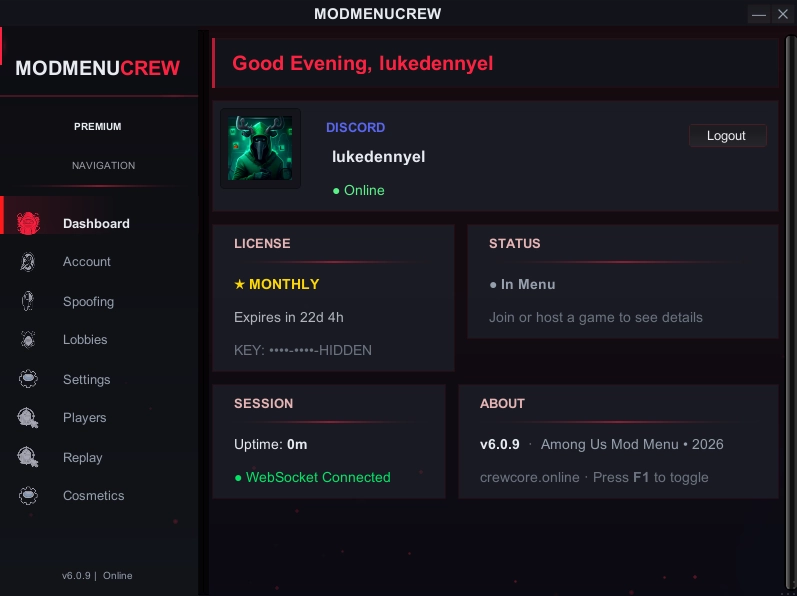
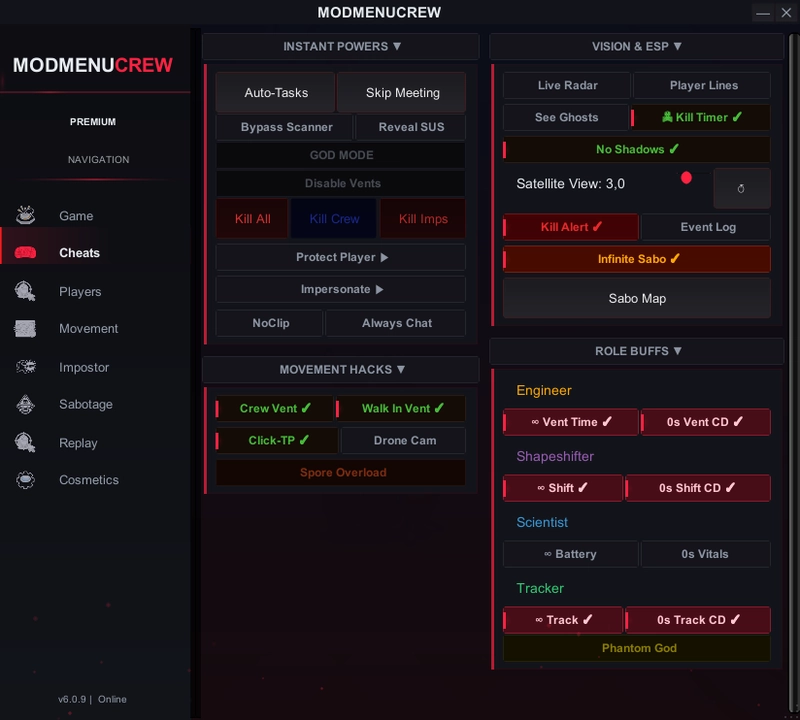
The ModMenuCrew dashboard inside Among Us on PC (F1 opens the menu).The cheats tab: Always Impostor, ESP, speed and more, one toggle each.
Which Among Us stores does ModMenuCrew support?
ModMenuCrew is a PC Among Us mod that loads through BepInEx. It works with every major PC store version of Among Us - the only real difference between stores is the install folder and which download package you pick. Find your store in the matrix, then grab the matching package from the download hub.
No native build; runs the Windows build via Proton (Linux/Deck) or Wine/CrossOver (macOS)
Store-by-store setup notes
Steam & Steam Deck
The most common install. Since the 2026.9.29 update the Steam build is 64-bit, so it uses the 64-bit package, the same as Epic, Microsoft Store and Xbox App. Extract it into steamapps\common\Among Us. BepInEx ships inside the package, so the mod loads on the next launch. On the Steam Deck, Among Us runs through Proton (a Windows layer), so the same package works - open the F1 menu with a keyboard.
Epic Games
Use the 64-bit package and extract it into the Epic install directory (Epic Games\AmongUs). The folder layout differs from Steam, but the mod and BepInEx behave identically once extracted.
Microsoft Store & Xbox App
These are the same UWP build - the Xbox App on PC and the Microsoft Store install share one package (the 64-bit one, the same as Steam and Epic). Store apps live in the protected WindowsApps folder, so the install guide shows how to have the Xbox app install the game in a normal folder, where the files can go.
Itch.io
Itch.io is the exception: its build is still 32-bit, so it has its own 32-bit package with BepInEx Legacy be.735. Extract it in the path you chose in the Itch app and launch as normal.
DLL-only (advanced)
Already run BepInEx manually? Grab the DLL-only package - just the ModMenuCrew loader (3 DLL files), no BepInEx - and drop it in your existing BepInEx\plugins folder. Delete an old ModMenuCrew.dll there: the loader replaces it.
Not supported
Consoles (Xbox, PlayStation, Switch) cannot load PC mods, and iPhone/iOS is not supported. There is no native macOS or Linux build, but the mod runs on them through Proton (Linux/Steam Deck) or Wine/CrossOver (macOS). The Android APK (CrewCore Mod Loader) is available now.
Version & OS compatibility
OS: Windows 10 and Windows 11 (64-bit). Steam Deck / Linux via Proton counts as Windows.
Among Us version: ModMenuCrew tracks the current Among Us 2026 release and is updated within a few days of each game patch. When your build is outdated, the mod tells you and you download the new one from the download page.
Store parity: all supported stores get the same 250+ features - store choice only changes the install folder, never the feature set.
Platform & compatibility FAQ
Does ModMenuCrew work on the Steam version of Among Us?
Yes - Steam is the most common install. Use the 64-bit package (the Steam build is 64-bit since the 2026.9.29 update) and extract it into steamapps\common\Among Us. BepInEx is included, so it loads on the next launch.
Does it work on Epic Games?
Yes. Use the 64-bit package and extract it into the Epic install folder (Epic Games\AmongUs). Same mod, different folder layout.
Microsoft Store or Xbox App - which package do I use?
The same one. The Microsoft Store and PC Xbox App installs are the same UWP build, so both use the 64-bit package, like Steam and Epic. Store apps sit in the protected WindowsApps folder - the install guide shows how to move the game to a normal folder with the Xbox app.
Does it work on Itch.io?
Yes. The Itch.io build is still 32-bit, so it uses its own 32-bit package (BepInEx Legacy be.735); only the install path you choose in the Itch app differs.
Does ModMenuCrew work on the Steam Deck?
Yes. Among Us on the Deck runs through Proton, a Windows compatibility layer, so the 64-bit package works. Open the F1 menu with a keyboard.
Does it work on Xbox console, PlayStation or Switch?
No. Consoles cannot load PC mods - the "Xbox App" on PC is not the same as an Xbox console.
Does it work on macOS or Linux?
Not natively - Among Us mods need Windows + BepInEx. Linux and the Steam Deck run the Windows build through Proton, and macOS through Wine or CrossOver.
Is there an Android or mobile version?
Yes - an Android APK is now available. Download the CrewCore Mod Loader from the download page, install it, and sign in. iOS is not supported.
Which Among Us version does it support?
The current 2026 release. ModMenuCrew is updated within a few days of each game patch. Since version 6.1.7 the mod updates itself: each time you open the game the loader checks for the current version and downloads it when there is a new one, and you only download again from the download page when the loader or BepInEx changes.
Do all stores get the same features?
Yes - all 250+ features work identically on every supported store. Your store choice only changes the install folder, never the feature set.
Is ModMenuCrew free?
Yes. All 250+ core features ship free; the free key takes about 2 minutes (Cloudflare Turnstile plus two sponsor links). Premium is optional and adds instant activation plus the Premium-only feature set.
How do I install it?
Download the package for your store, extract into the Among Us folder (BepInEx ships in the full packages), launch Among Us, press F1, and activate with a key. Full walkthrough: BepInEx install guide.
Where do I get support?
The official CrewCore Discord community plus the Discord bot. Both free and Premium users use the same channels.